





























Sign up for 3 days of Pro, claim now

Undetectable AI interview copilot Professional-grade help for LeetCode, online assessments, system design, and OOD

An all-in-one copilot for technical interviews , online assessments , and job search prep . Get instant solutions, live voice prompts, screenshot solving, and screen-share-safe guidance . No setup. Ready from the first run. Built for software engineers first, with support for product, data, operations, and leadership interviews.

encrypted

Local-First Privacy

Core interview data stays on your device

bolt

Low-Latency Response

Get structured guidance as soon as questions land

rocket_launch

Install and Go

Unbox and rehearse in minutes with a fast first-run check

Role coverage LeetCode Interview System Design ACM & Algorithms Technical Interview HackerRank OA CodeSignal Prep Mock Interview Resume Builder
Industry Leading
80k+
82,547+ Job Seekers
Successfully landed offers
4.9/5

Interview Workflow Suite

Live Assist · Instant Solver · Resume Builder · Top Questions

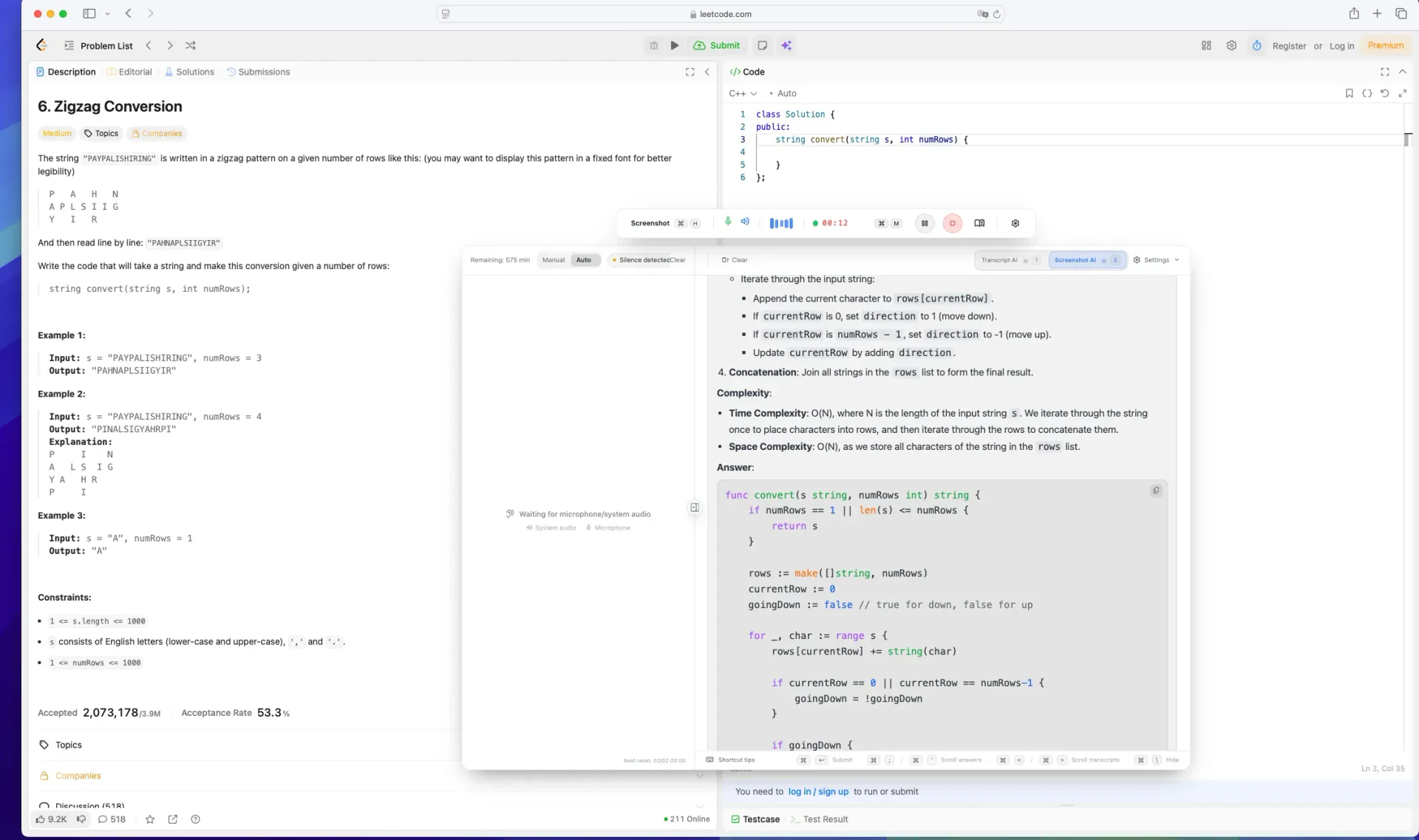
Interview Voice Transcript + Live AI Assist

Transcribe interview questions instantly and get live AI guidance to reduce freezing and anxiety, with clearer answers .

Loading preview...
Stealth Technology

20+ Anti-Detection Features

Industry's most advanced stealth technology, undetectable under any monitoring environment

Worried about detection? Validate first with our toolbox. We strive to cover mainstream interview platform checks, including Zoom, Teams, Meet, and HackerRank.

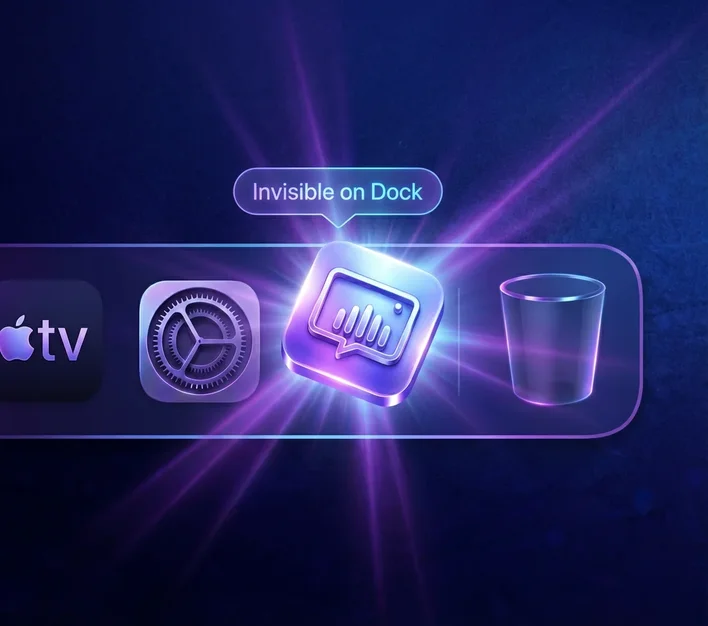
Dock Invisible 01 / 04
Dock Invisible icon

Invisible During Screen Share

Dock Invisible

The app stays hidden from your Dock and app switcher while running. Even when you share your full desktop in a meeting, no suspicious app is visible.

02 / 04
Process-Level Stealth icon

Hidden in Activity Monitor

Process-Level Stealth

No recognizable tool process shows up in macOS Activity Monitor. Even during remote IT checks, suspicious process traces are hard to identify.

03 / 04
Recording Invisible icon

No Overlay in Recording

Recording Invisible

Even if the interviewer starts screen recording, your helper overlay won't be captured. The final recording shows only normal interview content.

04 / 04
Click-Through icon

No Focus Stealing

Click-Through

Click-through lets you operate your IDE or browser behind the overlay without focus stealing. No abrupt window switching and no obvious interaction traces.

Swipe or tap indicators to switch (auto-rotates)

Anti-Cheat Self-Check Try for free

Worried about detection? Validate first with our toolbox. We strive to cover mainstream interview platform checks, including Zoom, Teams, Meet, and HackerRank.

Seamless Integration

Works across interviews, meetings, and remote desktop environments

Zoom
Google Meet
Microsoft Teams
Webex
Amazon Chime
Lark / Feishu
WeCom
DingTalk
HackerRank
CoderPad
Codility
Any meeting app
Including interview platforms, enterprise tools, and custom meeting setups
More Features

From resume building to question practice, from AI review to multi-platform sync — your complete interview companion

Core Feature

AI Review & Scoring

Smart Dashboard

View interview data and AI conversation history. Smart review of each interview with detailed scoring and improvement suggestions.

89%
156
Safety First

Smart Detection System

Stealth Self-Test

One-click environment safety check . Simulates detection mechanisms from top companies to ensure you're fully protected during interviews.

Dock
Process
Recording
Focus
Live

One-Click Professional Resume

AI Resume Builder

Live

Curated Interview Questions

Question Bank

Algorithms
System Design
Behavioral
Easy
Medium
Hard
Coming Soon

Real Scenario Practice

Mock Interview

Coming Soon

Multi-Device Sync

Multi-Platform

More features coming soon, stay tuned

Transparent Pricing · Free Trial

Give Yourself a Chance

Transparent pricing, cancel anytime, no hidden fees

Your Competitors May Already Be Using It Don't let opportunity cost become your biggest career regret — stay ahead and start winning now
Monthly pricing shown below | View all plans

Free

$0 per month
  • assignment
    5 AI assistant credits per week
  • menu_book
    High-frequency interview question bank
  • event
    Interview plan sync reminders
  • description
    Basic resume builder with templates and import/export
  • headset_mic
    One-time voice trial minutes for new sign-ups
  • shield
    20+ anti-detection safeguards for stealth mode
  • card_giftcard
    3 days of Pro included on first signup
Get Started

Pro

$99 $49 per month
  • edit_note
    Unlimited daily written-test assistance
  • verified
    90% accuracy assurance
  • auto_awesome
    Unlimited advanced AI models
  • replay
    Automated interview replay
  • timer
    Advanced voice mode (2 hours per week)
  • description
    Unlock 22 resume templates (includes Pro-exclusive layouts)
  • school
    Personalized knowledge base (10 items)
  • event
    Core resume benefits
  • shield
    20+ anti-detection safeguards for stealth mode
Upgrade to Pro
Most Popular

Flagship

LIMITED
$199 $88 per month
  • done_all
    Everything in Pro (plus interview review & scoring)
  • edit_note
    Unlimited daily written-test assistance
  • verified
    99% accuracy assurance
  • auto_awesome
    Unlimited top-tier AI models
  • replay
    Automated interview replay
  • timer
    Advanced voice mode (10 hours per week)
  • settings_suggest
    Custom AI model configuration
  • storage
    Personalized knowledge base (30 items)
  • school
    Unlock all resume templates
  • analytics
    Full resume editing suite (includes AI polish & translation)
  • support_agent
    Priority support
  • shield
    20+ anti-detection safeguards for stealth mode
Explore Flagship
Secure Payment
Cancel Anytime
Multiple Payment Methods
Daily Verified

Covers Zoom, Teams, Meet and more. 24/7 automated testing ensures stable stealth mode

Interviewer Sees Nothing

← Drag to compare both views →

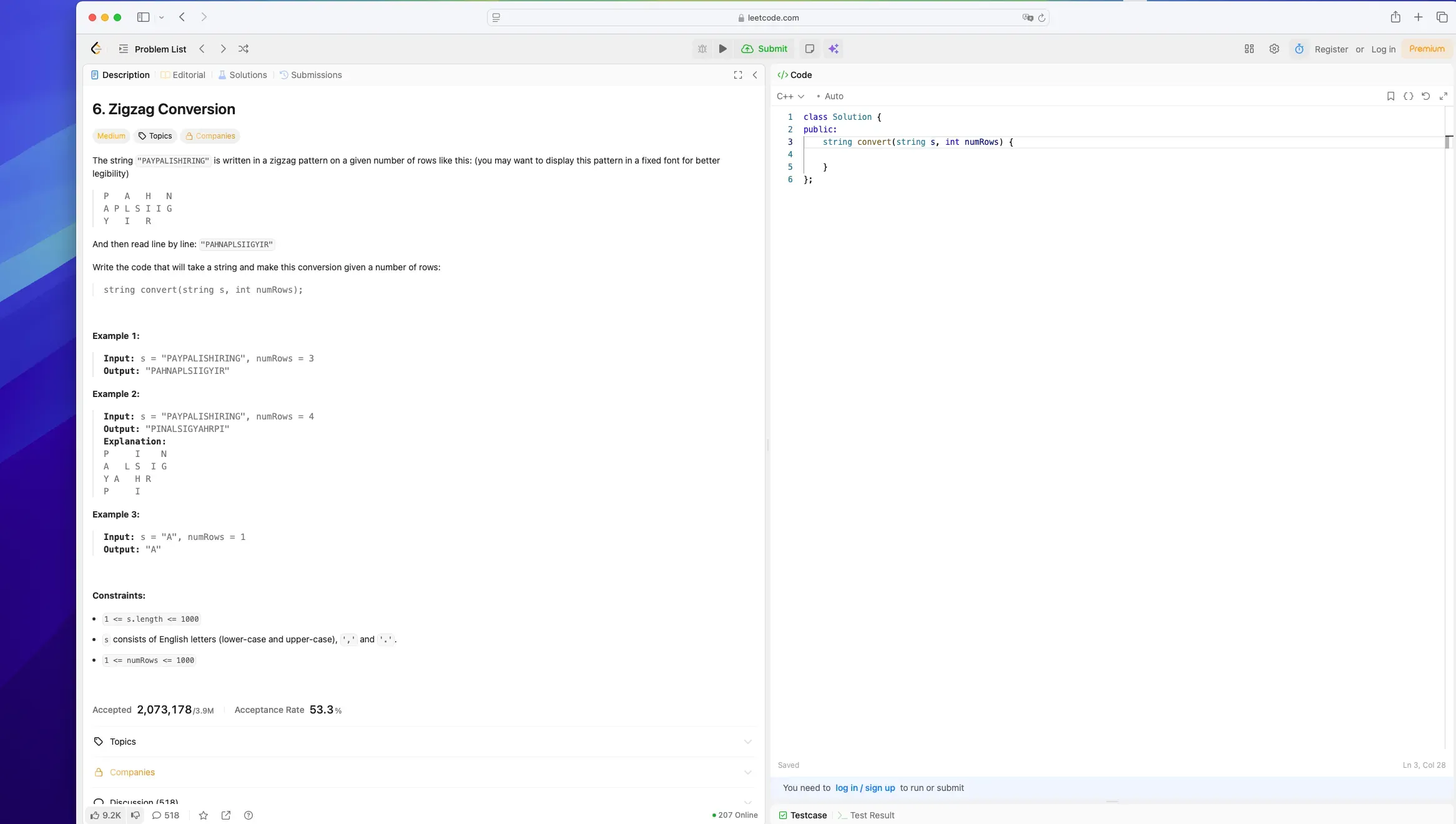
What the interviewer sees — clean screen
Your screen with assistant visible
drag_indicator
visibility Your view
Interviewer's view
lock Privacy Protected
swipe Drag the slider to compare
Real Environments, Daily Verified

Verified on Real Platforms

Validated daily across real platforms for reliable stealth performance

01
Zoom
Zoom
✓ Verified
Last tested 3 hours ago
Works with Zoom 100% Ready

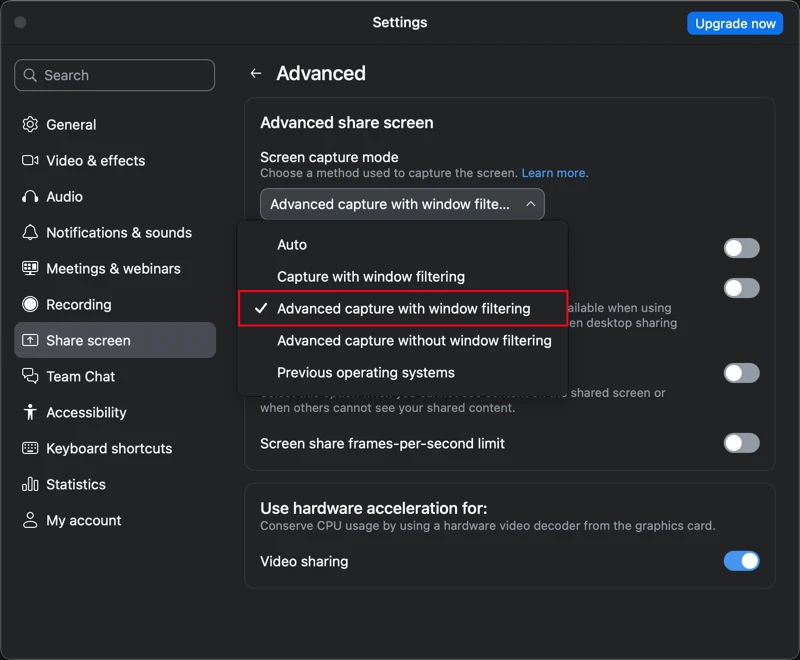
Open Zoom Settings → Screen Share → Advanced, and keep advanced capture with window filtering enabled to stay fully invisible.

Zoom stealth setup
02
Microsoft Teams
Microsoft Teams
✓ Verified
Last tested 2 hours ago
Works with Microsoft Teams 100% Ready
03
Google Meet
Google Meet
✓ Verified
Last tested 5 hours ago
Works with Google Meet 100% Ready
04
Tencent Meeting
Tencent Meeting
✓ Verified
Last tested 4 hours ago
Works with Tencent Meeting 100% Ready

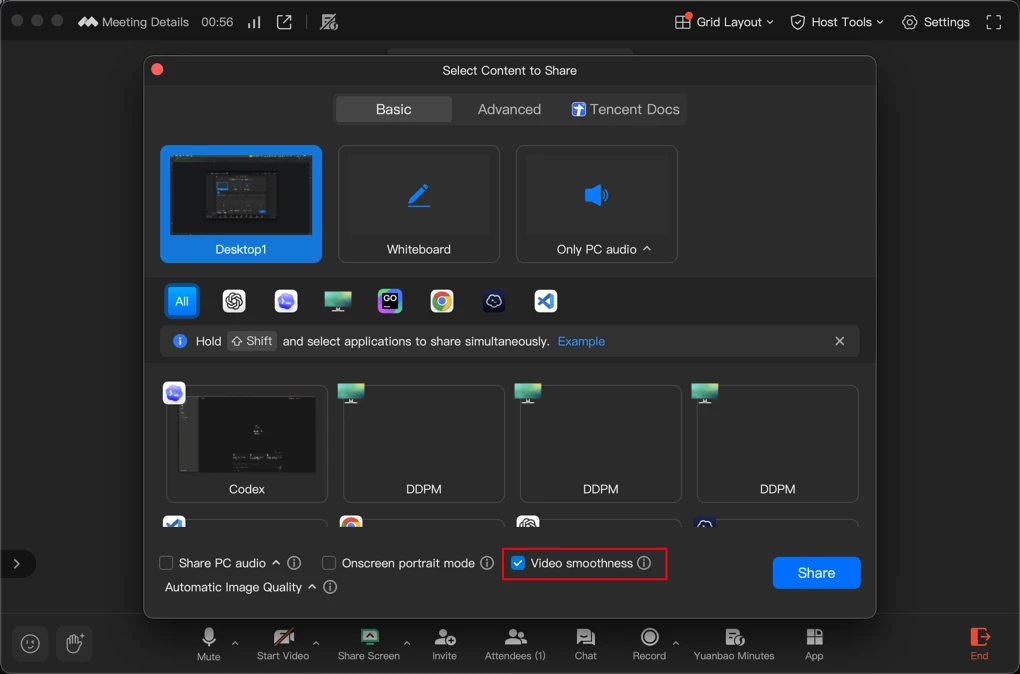
When sharing video, choose Standard mode and enable 'Prefer video smoothness' for the most stable stealth performance.

Tencent Meeting stealth setup
05
Feishu
Feishu
✓ Verified
Last tested 6 hours ago
Works with Feishu 100% Ready
06
Amazon Chime
Amazon Chime
✓ Verified
Last tested 4 hours ago
Works with Amazon Chime 100% Ready
07
Webex
Webex
✓ Verified
Last tested 5 hours ago
Works with Webex 100% Ready
08
Chrome
Chrome
✓ Verified
Last tested 2 hours ago
Works with Chrome 100% Ready
09
Edge
Edge
✓ Verified
Last tested 3 hours ago
Works with Edge 100% Ready
10
Lark / Feishu
Lark / Feishu
✓ Verified
Last tested 3 hrs ago
Works with Lark / Feishu 100% Ready
11
WeCom
WeCom
✓ Verified
Last tested 9 hrs ago
Works with WeCom 100% Ready
12
DingTalk
DingTalk
✓ Verified
Last tested 6 hrs ago
Works with DingTalk 100% Ready
13
HackerRank
HackerRank
✓ Verified
Last tested 23 hrs ago
Works with coding interview platforms 100% Ready
14
CoderPad
CoderPad
✓ Verified
Last tested 11 hrs ago
Stable for live collaborative editors 100% Ready
15
Codility
Codility
✓ Verified
Last tested 19 hrs ago
Built for proctored-style coding flows 100% Ready
Loved by Real Users

Don't take our word for it.

Success Stories from the Community

Real feedback from engineers and professionals who've used it in actual interviews.

star

4.9 /5

overall satisfaction

reviews

10,000 +

verified user reviews

bolt

24

continuous optimization

“The system design nudges were surprisingly on-point. I stopped rambling and landed a clean tradeoff story.”

Sarah J.
Sarah J.
Senior Backend Engineer — passed system design at Meta

“It picked up what I was coding and flagged edge cases I would’ve missed. Saved me mid-round.”

Michael C.
Michael C.
Full-Stack Developer — LeetCode Medium to Hard in weeks

“STAR prompts made my answers tighter—less fluff, more signal. I felt noticeably more confident.”

Elena R.
Elena R.
Product Manager — behavioral STAR nailed at Google

“Latency is the best part—it feels like an invisible coach. No awkward delay, no context loss.”

Daniel K.
Daniel K.
Staff Engineer — system design at FAANG

“Privacy-first was the deciding factor. Local overlay + clear controls gave me real peace of mind.”

Alicia W.
Alicia W.
Security-minded SWE — stealth-first workflow

“Perfect pacing in system design. When I got stuck, the hints nudged me back to the right layer.”

Kevin L.
Kevin L.
Platform Engineer — ACM contest prep

“The overlay is subtle and doesn’t distract. Feels like notes—not a ‘bot’ running in the meeting.”

Lena H.
Lena H.
Data Engineer — CodeSignal assessment cleared

“For coding rounds, the reminders on complexity + corner cases are gold. I moved faster and cleaner.”

Ben M.
Ben M.
ML Engineer — LeetCode & system design combo
Feature Comparison

Why Choose Interview AiBox

Compared to other products, we lead in stealth technology and response speed

Industry Top 1
Weekly Updates
Cutting-edge Tech
Crafted with Care

Choose Competitor

Interview AiBox

One plan covers core scenarios with stronger overall value

Cluely

Voice-only plan with narrower coverage

image

Instant Screenshot Analysis

AiBox

Supported

Cluely

Supported
mic

Real-time Voice Transcription

AiBox

Supported

Cluely

Supported
psychology

High-Quality Solving Model

AiBox

Supported

Cluely

Not supported
description

Resume Creation & Polish

AiBox

Supported

Cluely

Not supported
assessment

Interview Review Summary

AiBox

Supported

Cluely

Not supported
event_note

Interview Plan Tracking

AiBox

Supported

Cluely

Not supported
verified_user

24h Self-check Tools

AiBox

Supported

Cluely

Not supported
visibility

Natural Eye Contact

AiBox

Supported

Cluely

Supported
keyboard

Focus/Keyboard Detection Safe ty

AiBox

Mouse & keyboard actions stay safe

Cluely

Only shortcuts are relatively safe
security

Overall Detection Risk

AiBox

Very low risk

Cluely

High risk
visibility_off

End-to-End Stealth

AiBox

Supported

Cluely

Not supported
workspace_premium

Keep your budget focused where it matters: fair pricing, strong experience. We keep refining the product so every interview feels more controlled.

Start with a 3-day free trial, then decide. One real interview workflow is enough to feel the difference.

Start Free Trial arrow_forward
FAQ

The 3 things candidates want clear before a live interview

Candidates usually want clarity on setup, privacy boundary, and fit, then a free trial before deciding whether to bring it into a real interview.

Validate the share-safe setup

Proof matters more than slogans. Rehearsing the exact screen-share and stealth path on your target platform is what reduces surprises in a live round.

Know the privacy boundary

Local-first by default. Sensitive context stays on-device wherever possible, with encrypted transfer paths and a clear privacy policy you can review first.

Try it free before you decide

It is not only for coding roles. Whether your loop is coding-heavy, system design, behavioral, or business-facing, start with the free tier and decide after trying the core workflow yourself.

No. Interview AiBox was first shaped around software engineer workflows such as coding rounds, online assessments, and system design, but it is not limited to technical roles anymore. We have also done substantial optimization for product, operations, sales, consulting, customer success, and other non-technical interviews, especially for behavioral rounds, business conversations, case-style answers, answer structure, and real-time prompting.

Download the desktop app and be interview-ready in minutes.

star star star star star 4.9/5 from 10,000+ reviews
verified Signed & verified builds memory Apple Silicon & Intel supported desktop_windows Windows x64

New users get Pro features unlocked on signup

Interview AiBox | Undetectable AI Interview Copilot for Software Engineers